
AI Citation Opportunity Monitor: Automated Brand Engagement
The Challenge of Real-Time Brand Monitoring
In today's fast-paced digital landscape, consumers are constantly discussing products, ingredients, and shopping experiences across social platforms. For grocery and retail brands, these conversations represent golden opportunities to provide value, build trust, and establish thought leadership. But manually monitoring dozens of communities for relevant discussions? That's a full-time job nobody has time for.
Enter the AI Citation Opportunity Monitor
This automated system scans Reddit every 10 minutes, hunting for high-value conversations where your brand expertise can genuinely help consumers. It's not about spam or self-promotion—it's about being present when people need answers.
How It Works
1. Intelligent Scanning
The system monitors 20 carefully selected subreddits where grocery and retail discussions thrive:
Shopping communities (r/grocery, r/Costco, r/aldi, r/traderjoes)
Budget-conscious groups (r/Frugal, r/EatCheapAndHealthy, r/budgetfood)
Dietary communities (r/keto, r/vegan, r/glutenfree, r/dairyfree)
Culinary spaces (r/Cooking, r/AskCulinary, r/MealPrepSunday)
2. Smart Classification
Each post is analyzed and categorized into one of five opportunity types:
CategoryDescriptionIngredient EducationQuestions about food science, nutrition facts, or ingredient sourcingBudget vs QualityPrice comparisons, value discussions, premium vs. store-brand debatesProduct SwapsSeeking alternatives for allergies, preferences, or availabilityDietary RestrictionsNavigating keto, vegan, gluten-free, or other dietary needsRetail TrustStore experiences, product quality concerns, shopping recommendations
3. Persona Matching
Not every expert voice fits every conversation. The system matches opportunities to the most credible persona:
Nutrition Adviser — For ingredient and health-focused discussions
Value Analyst — For budget and price comparison topics
Culinary Expert — For cooking techniques and recipe questions
Operations Manager — For supply chain and availability inquiries
Pharmacist — For supplement and dietary restriction guidance
4. Compliance-Aware Response Generation
Using GPT-5, the system drafts 2-4 response options for each opportunity. Every response includes:
Appropriate disclosure language
Helpful, educational content
No aggressive sales pitches
Tone matching for the community
5. Slack Alerts with Action Buttons
When opportunities are found, structured alerts arrive in your Slack channel with:
Post summary and direct link
Confidence score and category
Pre-drafted response options
One-click action buttons
The Technical Foundation
Built on the Mastra framework, this automation leverages:
Time-based triggers running every 10 minutes
5-step workflow orchestration with error handling
AI-powered classification using advanced language models
Weighted persona matching algorithms
Slack integration for real-time team notifications
Why This Matters
Speed: Opportunities decay quickly. A helpful response within the first hour of a post gets 10x more visibility than one posted days later.
Consistency: Every opportunity is evaluated using the same criteria, ensuring nothing slips through the cracks.
Quality: AI-generated drafts maintain brand voice while human reviewers make final decisions.
Scale: Monitor 20+ communities simultaneously—something no human team could sustain.
Getting Started
The system requires two simple configurations:
Reddit API credentials for accessing post data
Slack webhook for delivering alerts to your team
Once configured, the monitor runs autonomously, surfacing opportunities and delivering actionable insights directly to your team's workflow.
Transform passive social monitoring into active brand building. Let AI find the conversations that matter—so your team can focus on providing genuine value.
Building an AI-Powered Social Monitoring Automation with Mastra
A step-by-step technical guide to creating automated content monitoring, classification, and alert systems using AI agents and workflows.
Overview
This guide walks you through building an automation that:
Scans social platforms on a schedule
Classifies content using AI
Matches opportunities to response strategies
Generates context-aware draft responses
Delivers actionable alerts to your team
Time to build: 2-3 hours
Difficulty: Intermediate
Stack: TypeScript, Mastra Framework, Inngest, OpenAI
Architecture
Step 1: Define Your Monitoring Scope
Before writing code, define:
Data Sources: Which platforms/APIs will you scan?
Categories: How will you classify content? (3-7 categories recommended)
Response Personas: What expert voices will respond? (2-5 personas)
Delivery Channel: Where do alerts go? (Slack, Discord, Email, etc.)
Prompt to Define Your Use Case
I want to build an automated monitoring system for [YOUR DOMAIN].
Help me define:
1. Five categories for classifying [CONTENT TYPE] based on [YOUR GOALS]
2. Three to five expert personas that could credibly respond
3. Keywords and patterns that indicate high-value opportunities
4. Risk factors that should flag content for human review
Step 2: Create the Scanner Tool
The scanner fetches content from your data source.
File: src/mastra/tools/scannerTool.ts
import    from "@mastra/core/tools";
import    from "zod";

export const scannerTool = createTool({
  id: "content-scanner",
  description: "Scans [PLATFORM] for relevant content opportunities",

  inputSchema: z.object({
    sources: z.array(z.string()).optional(),
    limit: z.number().default(20),
  }),

  outputSchema: z.object({
    items: z.array(z.object({
      id: z.string(),
      title: z.string(),
      content: z.string(),
      source: z.string(),
      url: z.string(),
      timestamp: z.number(),
      metadata: z.record(z.any()).optional(),
    })),
    totalScanned: z.number(),
    scanTimestamp: z.string(),
  }),

  execute: async ({ context, mastra }) => {
    const logger = mastra?.getLogger();
    logger?.info("🔍 [Scanner] Starting content scan");

    const { sources, limit } = context;
    const items = [];

    // YOUR API FETCHING LOGIC HERE
    // Example: fetch from Reddit, Twitter, RSS, database, etc.

    logger?.info(`✅ [Scanner] Found $ items`);

    return {
      items,
      totalScanned: items.length,
      scanTimestamp: new Date().toISOString(),
    };
  },
});
Prompt for Scanner Implementation
Write a TypeScript function that fetches recent posts from [PLATFORM API].

Requirements:
- Authenticate using environment variables
- Fetch from multiple sources/channels: [LIST SOURCES]
- Filter for posts containing keywords: [LIST KEYWORDS]
- Return structured data with: id, title, content, source, url, timestamp
- Include error handling and rate limiting
- Log progress for debugging
Step 3: Create the Classification Tool
The classifier uses AI to categorize content.
import    from "@mastra/core/tools";
import    from "zod";

const CATEGORIES = {
  "category-1": {
    name: "Category One",
    description: "Description of what this category covers",
    keywords: ["keyword1", "keyword2"],
  },
  // Add more categories...
};

export const classificationTool = createTool({
  id: "content-classifier",
  description: "Classifies content into predefined categories using AI",

  inputSchema: z.object({
    items: z.array(z.object({
      id: z.string(),
      title: z.string(),
      content: z.string(),
      source: z.string(),
    })),
    confidenceThreshold: z.number().default(0.5),
  }),

  outputSchema: z.object({
    classifiedItems: z.array(z.object({
      id: z.string(),
      title: z.string(),
      content: z.string(),
      source: z.string(),
      category: z.string(),
      confidence: z.number(),
      reasoning: z.string(),
    })),
    totalClassified: z.number(),
  }),

  execute: async ({ context, mastra, runtimeContext }) => {
    const logger = mastra?.getLogger();
    const agent = mastra?.getAgent("classifier-agent");

    const classifiedItems = [];

    for (const item of context.items) {
      const result = await agent?.generate(
        `Classify this content into one of these categories: $

        Title: $
        Content: $

        Respond with JSON: { "category": "category-id", "confidence": 0.0-1.0, "reasoning": "why" }`
      );

      // Parse and add to results
    }

    return { classifiedItems, totalClassified: classifiedItems.length };
  },
});
Prompt for Classification Logic
Create a classification system for [CONTENT TYPE] with these categories:

1. [CATEGORY 1]: [DESCRIPTION]
2. [CATEGORY 2]: [DESCRIPTION]
3. [CATEGORY 3]: [DESCRIPTION]

For each piece of content, determine:
- Primary category (highest relevance)
- Confidence score (0.0 to 1.0)
- Key signals that influenced the classification
- Risk level (low/medium/high) based on [RISK CRITERIA]

Provide the classification prompt I should use with GPT-5.
Step 4: Create the Persona Matcher Tool
Match classified content to the best response persona.
File: src/mastra/tools/matcherTool.ts
import    from "@mastra/core/tools";
import    from "zod";

const PERSONAS = {
  "expert-1": {
    name: "Expert Name",
    title: "Professional Title",
    strengths: ["category-1", "category-2"],
    tone: "professional and helpful",
    disclosure: "Disclosure statement here",
  },
  // Add more personas...
};

export const matcherTool = createTool({
  id: "persona-matcher",
  description: "Matches content to optimal response personas",

  inputSchema: z.object({
    classifiedItems: z.array(z.object({
      id: z.string(),
      category: z.string(),
      confidence: z.number(),
    })),
  }),

  outputSchema: z.object({
    matchedItems: z.array(z.object({
      itemId: z.string(),
      personaId: z.string(),
      personaName: z.string(),
      matchScore: z.number(),
    })),
  }),

  execute: async ({ context, mastra }) => {
    const logger = mastra?.getLogger();

    const matchedItems = context.classifiedItems.map(item => {
      // Score each persona based on category alignment
      let bestMatch = { personaId: "", score: 0 };

      for (const [id, persona] of Object.entries(PERSONAS)) {
        const score = persona.strengths.includes(item.category) ? 0.9 : 0.3;
        if (score > bestMatch.score) {
          bestMatch = { personaId: id, score };
        }
      }

      return {
        itemId: item.id,
        personaId: bestMatch.personaId,
        personaName: PERSONAS[bestMatch.personaId].name,
        matchScore: bestMatch.score,
      };
    });

    return   ;
  },
});
Step 5: Create the Response Generator Tool
Generate draft responses using AI.
File: src/mastra/tools/responseGeneratorTool.ts
import    from "@mastra/core/tools";
import    from "zod";

export const responseGeneratorTool = createTool({
  id: "response-generator",
  description: "Generates persona-appropriate draft responses",

  inputSchema: z.object({
    items: z.array(z.object({
      id: z.string(),
      title: z.string(),
      content: z.string(),
      personaName: z.string(),
      personaTone: z.string(),
      disclosure: z.string(),
    })),
    responsesPerItem: z.number().default(2),
  }),

  outputSchema: z.object({
    generatedResponses: z.array(z.object({
      itemId: z.string(),
      responses: z.array(z.object({
        text: z.string(),
        approach: z.string(),
      })),
    })),
  }),

  execute: async ({ context, mastra }) => {
    const agent = mastra?.getAgent("response-agent");

    const results = [];

    for (const item of context.items) {
      const prompt = `
        As $, write $ helpful responses to this:

        "$"
        $

        Guidelines:
        - Tone: $
        - Include disclosure: $
        - Be genuinely helpful, not promotional
        - Each response should take a different approach
      `;

      const result = await agent?.generate(prompt);
      // Parse and structure responses
    }

    return { generatedResponses: results };
  },
});
Prompt for Response Generation
Create a response generation prompt for [YOUR USE CASE].

The AI should generate [NUMBER] response variations that:
- Match the persona's voice and expertise
- Address the user's specific question/concern
- Include appropriate disclosures
- Avoid [LIST THINGS TO AVOID]
- Follow community guidelines for [PLATFORM]

Each response should take a different approach:
1. Direct answer
2. Educational context
3. Personal experience angle
Step 6: Create the Delivery Tool
Send alerts to your team.
File: src/mastra/tools/deliveryTool.ts
import    from "@mastra/core/tools";
import    from "zod";

export const deliveryTool = createTool({
  id: "alert-delivery",
  description: "Delivers opportunity alerts to team channels",

  inputSchema: z.object({
    alerts: z.array(z.object({
      title: z.string(),
      url: z.string(),
      category: z.string(),
      persona: z.string(),
      responses: z.array(z.string()),
      confidence: z.number(),
    })),
    webhookUrl: z.string().optional(),
  }),

  outputSchema: z.object({
    delivered: z.number(),
    failed: z.number(),
  }),

  execute: async ({ context, mastra }) => {
    const logger = mastra?.getLogger();
    const webhookUrl = context.webhookUrl || process.env.SLACK_WEBHOOK_URL;

    if (!webhookUrl) {
      logger?.warn("No webhook URL configured");
      return { delivered: 0, failed: 0 };
    }

    let delivered = 0;

    for (const alert of context.alerts) {
      const payload = {
        blocks: [
          {
            type: "header",
            text: { type: "plain_text", text: `🎯 $
          },
          {
            type: "section",
            text: { type: "mrkdwn", text: `*$
          },
          // Add response options, buttons, etc.
        ]
      };

      const response = await fetch(webhookUrl, {
        method: "POST",
        headers: { "Content-Type": "application/json" },
        body: JSON.stringify(payload),
      });

      if (response.ok) delivered++;
    }

    return { delivered, failed: context.alerts.length - delivered };
  },
});
Step 7: Build the Workflow
Orchestrate all tools into a cohesive workflow.
File: src/mastra/workflows/monitoringWorkflow.ts
import { createStep, createWorkflow } from "../inngest";
import    from "zod";

import    from "../tools/scannerTool";
import    from "../tools/classificationTool";
import    from "../tools/matcherTool";
import    from "../tools/responseGeneratorTool";
import    from "../tools/deliveryTool";

const scanStep = createStep({
  id: "scan",
  inputSchema: z.object({}),
  outputSchema: z.object({ /* ... */ }),
  execute: async ({ mastra, runtimeContext }) => {
    return await scannerTool.execute({ context: {}, mastra, runtimeContext });
  },
});

const classifyStep = createStep({
  id: "classify",
  inputSchema: z.object({ /* from scan */ }),
  outputSchema: z.object({ /* ... */ }),
  execute: async ({ inputData, mastra, runtimeContext }) => {
    return await classificationTool.execute({
      context: { items: inputData.items },
      mastra,
      runtimeContext
    });
  },
});

// Add remaining steps...

export const monitoringWorkflow = createWorkflow({
  id: "monitoring-workflow",
  inputSchema: z.object({}),
  outputSchema: z.object({ /* ... */ }),
})
  .then(scanStep)
  .then(classifyStep)
  .then(matchStep)
  .then(generateStep)
  .then(deliverStep)
  .commit();
Step 8: Configure the Cron Trigger
Set up scheduled execution.
File: src/mastra/triggers/cronTrigger.ts
import    from "../inngest";
import    from "../index";

export const cronTrigger = inngest.createFunction(
  { id: "scheduled-monitor", name: "Scheduled Monitor" },
  { cron: "*/10 * * * *" }, // Every 10 minutes
  async ({ event, step }) => {
    const workflow = mastra.getWorkflow("monitoring-workflow");
    await workflow.start({ inputData:  );
    return { status: "success" };
  }
);
Step 9: Register Everything
File: src/mastra/index.ts
import    from "@mastra/core";
import    from "./tools/scannerTool";
import    from "./tools/classificationTool";
// ... import other tools

import    from "./agents/classifierAgent";
import    from "./agents/responseAgent";

import    from "./workflows/monitoringWorkflow";

export const mastra = new Mastra({
  tools: {
    scannerTool,
    classificationTool,
    // ... other tools
  },
  agents: {
    classifierAgent,
    responseAgent,
  },
  workflows:

  ,
});
Step 10: Test Your Automation
Manual Test Command
curl -X POST http://localhost:5000/api/workflows/monitoring-workflow/start-async \
  -H "Content-Type: application/json" \
  -d '{"inputData": '
Test Script
// tests/testAutomation.ts
import Inngest from "inngest";

const inngest = new Inngest({ id: "test" });

async function test() {
  await inngest.send({
    name: "replit/cron.trigger",
    data: { test: true }
  });
  console.log("✅ Trigger sent!");
}

test();
Configuration Checklist
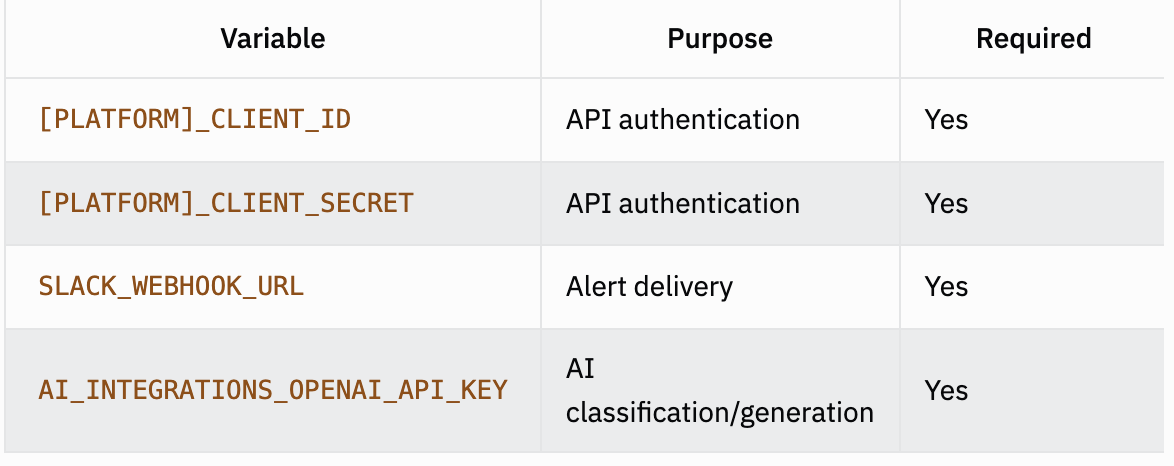
Customization Ideas
Multi-platform: Add scanners for Twitter, Discord, forums
Sentiment analysis: Add sentiment scoring to classification
Priority queuing: Route high-confidence items to different channels
Analytics: Track response rates and engagement over time
Approval workflow: Add human-in-the-loop before posting responses
Troubleshooting
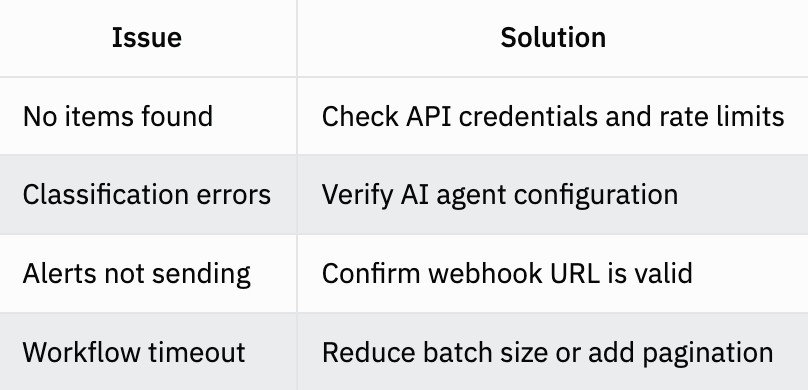
This pattern adapts to any monitoring use case: customer support, competitive intelligence, trend detection, community management, and more.