
Simple Project Management: A Modern Kanban App Built for Speed and Clarity
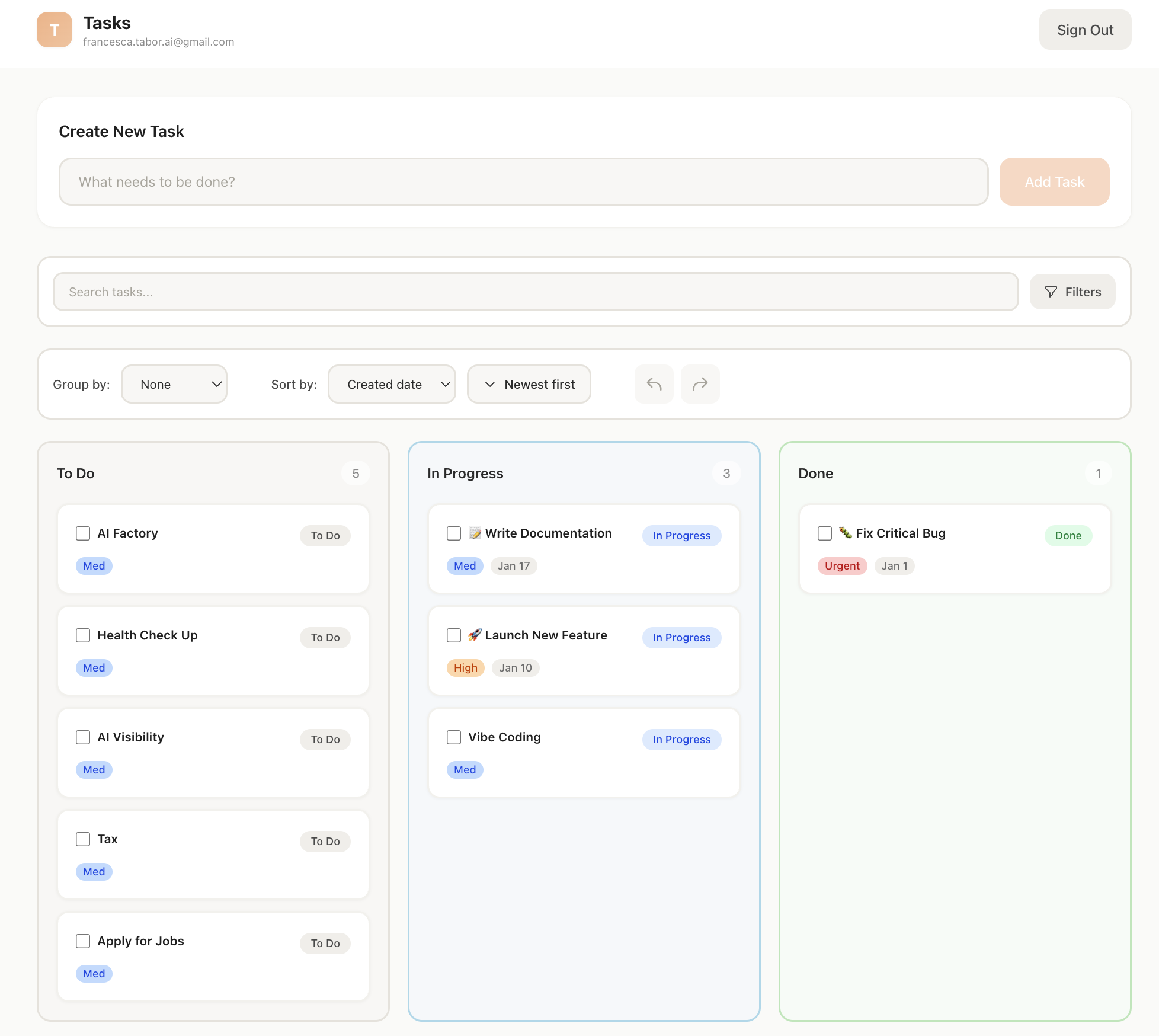
Managing tasks shouldn’t feel like managing chaos. Simple Project Management is a modern, feature-rich Kanban task management application designed to help individuals and teams stay focused, organized, and productive—without unnecessary complexity.
Built with cutting-edge web technologies, this app combines a clean user experience with powerful integrations that automate everyday workflows.
What Is Simple Project Management?
Simple Project Management is a web-based Kanban application that allows users to plan, track, and complete work visually. Tasks flow naturally through columns like To Do, In Progress, and Done, making it easy to see progress at a glance.
Under the hood, the app is powered by Next.js, React, TypeScript, and Supabase, ensuring high performance, scalability, and a smooth developer experience.
Key Features
Advanced Kanban Task Management
Drag-and-drop tasks between columns
Inline editing for titles and statuses
Bulk actions for faster task updates
Smart sorting by date, priority, or creation time
Swimlanes to group tasks by assignee, label, or priority
📝 Rich Task Details
Each task supports:
Descriptions and checklists
Due dates and priorities
Labels and assignees
File attachments
All changes are automatically saved with a responsive autosave system.
Productivity Built In
Undo / Redo
Mistakes happen. Full undo and redo support lets you confidently experiment without fear of losing work.
Search & Filters
Instant full-text search combined with advanced filters makes finding the right task effortless—even in large projects.
Mobile-Responsive Design
The interface adapts seamlessly to mobile devices, with horizontal scrolling and touch-optimized interactions.
Smart Integrations
Google Calendar Sync
Tasks with due dates automatically sync to your Google Calendar. Updates to a task are reflected instantly on the calendar, keeping schedules aligned without manual effort.
WhatsApp Voice-to-Task
One of the app’s standout features is voice-driven task creation:
Send a WhatsApp voice note
Audio is transcribed using AI
Task details (title, priority, due date) are extracted automatically
A new task is created and labeled
This turns spoken reminders into actionable tasks in seconds.
Technology Stack
Frontend: Next.js (App Router), React, TypeScript
Styling: Tailwind CSS
Backend: Supabase (PostgreSQL, Auth, Row-Level Security)
Authentication: NextAuth.js with Google OAuth
APIs: Google Calendar, WhatsApp (Twilio), OpenAI
Deployment: Vercel-ready with automatic builds
This stack ensures excellent performance, security, and long-term maintainability.
Deployment & Scalability
The app is designed for seamless deployment on Vercel, with environment-based configuration for development and production. It supports secure authentication, scalable databases, and production-ready CI/CD workflows.
Who Is This App For?
Freelancers managing multiple clients
Founders tracking product roadmaps
Small teams collaborating on shared tasks
Power users who want automation without bloated tools
What’s Next?
The roadmap includes:
Recurring tasks
Task templates
Dark mode
Offline support
Team collaboration
Desktop app packaging
Each feature is designed to enhance productivity without sacrificing simplicity.
VIBE CODED PROMPTS
PROMPT 1
To this Next.js starter project, add Supabase Auth and Database with Tailwind v4 ONLY.
Pages:
/auth/login(email+password)/auth/signup(email+password)/auth/reset-password(request link)/app(protected area)
Behavior:
If NOT logged in, any visit to
/or any/app*route must redirect to/login.If logged in and visiting
/, redirect to/app./appshows exactly: "This page can only be seen by logged-in users."
Default logged-in page must have a sign out button
PROMPT 2
In this app, using the Supabase MCP server that is installed, create an ultra minimal database that will allow users to store tasks with three different statuses: pending, in progress, done. Then, create an ultra minimal UI that lets users create these new tasks and move them around in a Kanban-style board between these three statuses. Only logged in users should be able to do this, and only with their own notes. Keep it simple, but secure.
Final Thoughts
Simple Project Management proves that powerful task management doesn’t need to be complicated. By combining a clean Kanban interface with smart automation and modern web technologies, it delivers a fast, intuitive, and extensible productivity tool built for real-world workflows.
If you’re looking for a modern example of a full-stack Next.js application—or a task manager that actually keeps up with how you work—this project delivers on both fronts.