
Top Chat GPT Use Cases for Technology & Software
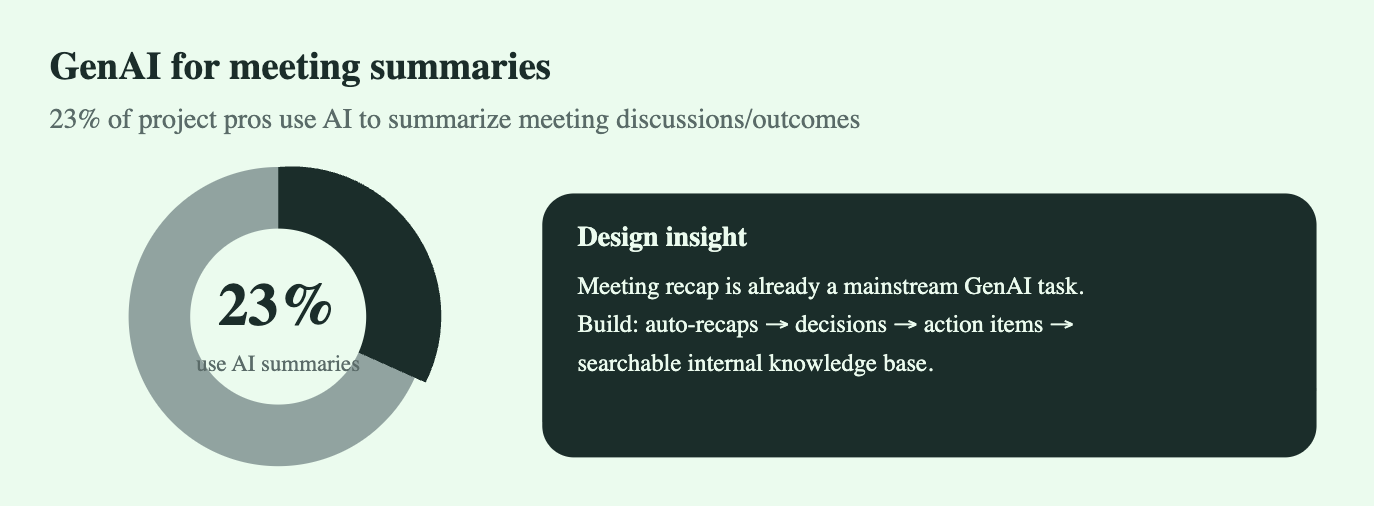
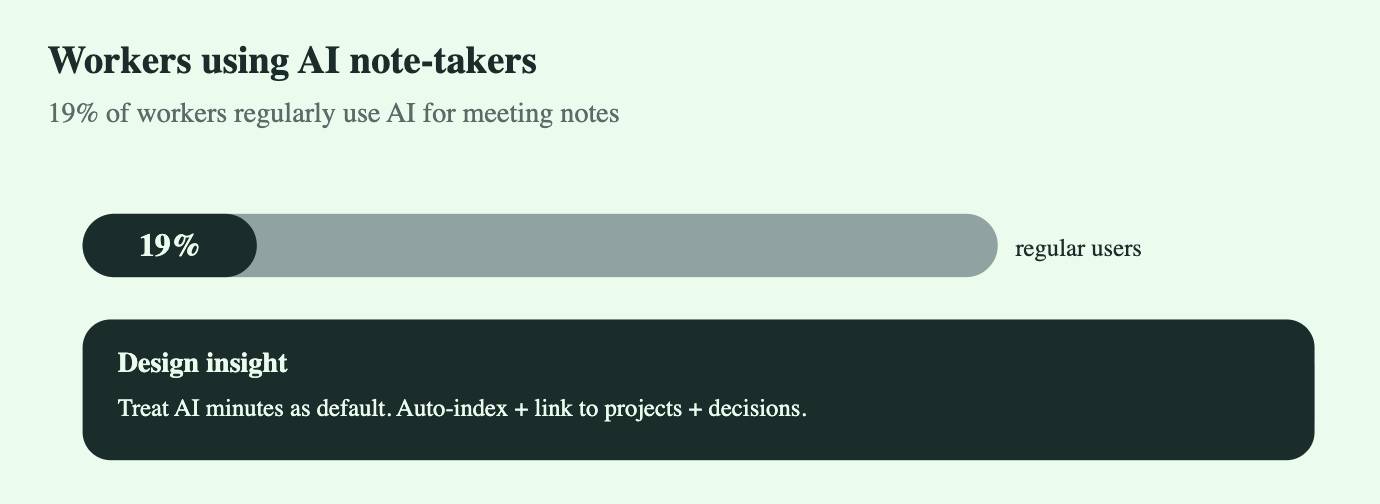
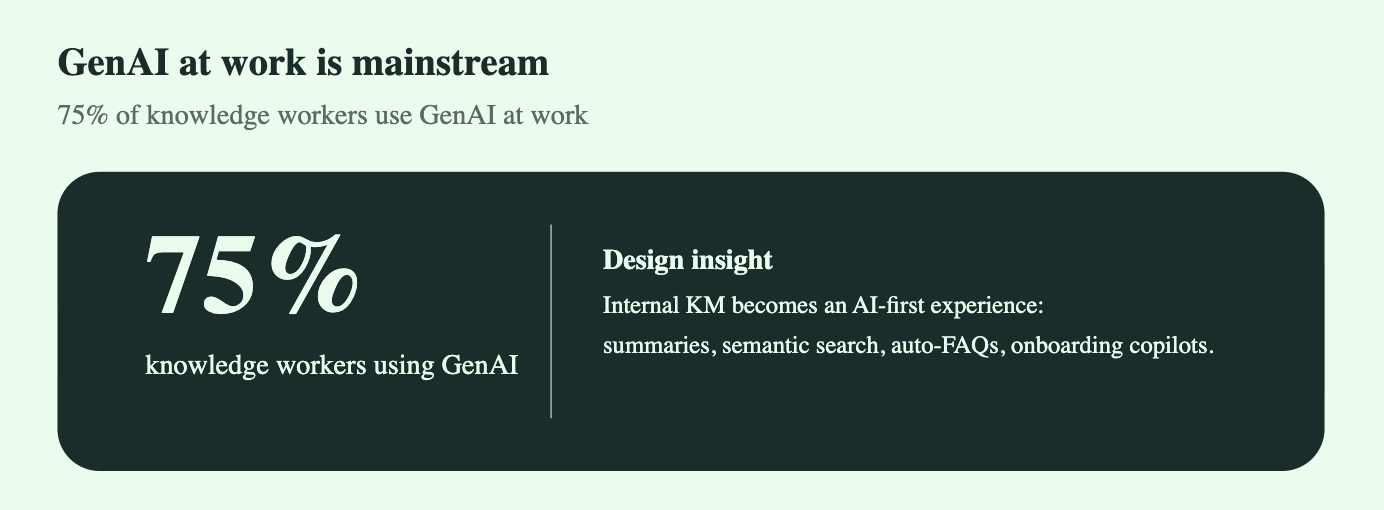
Use Case 1 - Developer productivity
AI-Driven Internal Knowledge Management
How modern organizations use generative AI to summarize documentation, meeting notes, and unlock institutional intelligence
Executive Summary
Internal knowledge management has always suffered from the same problems: inconsistent documentation, endless meetings, fragmented tools, and an overreliance on memory. GenAI finally fixes this.
Across the nine articles analyzed—from Atlassian, Arya.AI, Pieces, ScienceDirect, Speck Agency, ThinkAI, GIVA, Monday.com, and AssemblyAI—one theme is unmistakable:
AI is becoming the operating system for internal knowledge.
This whitepaper consolidates all findings into a single, strategic narrative for teams adopting AI summarization, AI note-takers, and semantic enterprise search.
1. Introduction: Why Internal Knowledge Is Broken
Teams face overwhelming information flows:
Meetings that no one documents properly
Docs buried in Notion, Confluence, Google Drive, Slack
Decisions made verbally and forgotten days later
Repetitive questions because context is scattered
Onboarding that depends on “tribal knowledge”
Generative AI changes the foundation of internal knowledge by enabling:
Automatic meeting transcription & summarization
Cross-tool semantic search
Auto-generated action items
Real-time knowledge capture from chats, emails, docs
Personalized insights for each role or team
Internal KM shifts from “update the wiki” to continuous, AI-curated knowledge flow.
2. Synthesis of Insights from All Articles
2.1 Atlassian – AI Meeting Notes
Key takeaway: AI reduces cognitive load by automatically summarizing meetings, extracting decisions, and organizing next steps.
Contribution to KM:
Immediate clarity post-meeting
Structured decision logs
Better project alignment
2.2 Arya.AI – Enterprise Knowledge Management
Key takeaway: AI shifts organizations from passive documentation to proactive knowledge assistants.
Contribution:
Personalized insights for employees
Multi-source ingestion
Dynamic knowledge retrieval
2.3 Pieces – Smarter Knowledge Capture
Key takeaway: AI can convert every conversation, snippet, or message into structured knowledge.
Contribution:
Continuous knowledge capture
Developer-friendly “second brain”
High impact for technical teams
2.4 ScienceDirect – Academic Perspective
Key takeaway: Research emphasizes risk and governance.
Contribution:
Need for human validation
Model accuracy monitoring
Compliance, auditing, access control
2.5 Speck Agency – AI Reshapes Internal Processes
Key takeaway: AI eliminates redundant documentation work.
Contribution:
Auto-updated internal documents
Process automation
Effortless documentation hygiene
2.6 ThinkAI – Reinventing Enterprise Search
Key takeaway: Semantic search replaces keyword search.
Contribution:
AI links meeting notes, docs, tools
Unified knowledge graph
Natural-language internal queries
2.7 GIVA – AI KM Systems Framework
Key takeaway: The AI-KM lifecycle is:
Capture → Curate → Discover → Deliver
Contribution:
Clear architecture for enterprise KM
Tool selection framework
2.8 Monday.com – Instant Internal Answers
Key takeaway: AI drastically reduces time spent searching for internal information.
Contribution:
Faster onboarding
Quicker troubleshooting
Better operational support
2.9 AssemblyAI – Meeting Transcript Summaries
Key takeaway: Best-practice pipeline:
Audio transcription
Semantic chunking
Summarization
Quality check
Structured summary output
Contribution:
Technical blueprint for building internal summarization engines
API workflows for real implementation
3. Why AI is Transforming Internal Knowledge Management
3.1 Volume of Meetings
Most employees spend 2–4 hours a day in meetings.
AI lets teams extract insights, not just words.
3.2 Context Loss
Information gets forgotten or goes unrecorded.
AI stores everything in real-time.
3.3 Tool Fragmentation
Docs live everywhere.
AI connects them into one knowledge interface.
3.4 High Onboarding Costs
New hires spend weeks learning context.
AI copilots compress this into hours.
3.5 Need for Organizational Memory
When employees leave, knowledge leaves.
AI creates a persistent knowledge layer.
4. The Architecture of an AI-Driven Internal Knowledge System
Below is a consolidated architecture combining insights from AssemblyAI, ThinkAI, GIVA, and Arya.AI.
4.1 Ingestion Layer
Pulls data from:
Slack, Teams, Discord
Zoom, Meet, Loom
Google Docs, Notion, Confluence
Jira, GitHub, Drive
4.2 Transcription Layer
High-accuracy voice-to-text with:
Speaker identification
Noise handling
Timestamp mapping
4.3 Semantic Chunking
Breaks content into:
Topics
Decisions
Context clusters
Ensures LLMs handle long documents.
4.4 LLM Processing Layer
Generates:
Summaries
Action items
Decisions
Issues/risks
Project timelines
Frequently asked questions
4.5 Indexing Layer
Vector embeddings stored in:
Pinecone
Weaviate
Milvus
Elastic + vector search
Purpose: enable natural-language discovery.
4.6 Knowledge Graph Layer
Links concepts, owners, tools, and decisions.
4.7 Delivery Layer
Examples:
“What did we decide about the Q3 rollout?”
“Summarize last week’s product meetings.”
“Give me all risks discussed in design meetings this month.”
4.8 Governance Layer
Includes:
Accuracy checks
Redaction & privacy
Role-based access
Audit trails
Human review
5. Core Use Cases for AI in Internal Knowledge
5.1 Automatic Meeting Summaries
Key points
Decisions
Action items
Owner & deadline matching
5.2 Project Digest
Weekly auto-generated:
Updates
Blockers
Risks
Dependencies
5.3 Central Knowledge Search
Ask questions and retrieve from:
Docs
Meetings
Chats
Wikis
5.4 Auto-Documentation
Create:
Product briefs
SOPs
Engineering docs
Release notes
5.5 Onboarding Copilot
Instant answers for new hires.
5.6 Department-Specific Copilots
Engineering copilot
Marketing copilot
HR policy copilot
Ops procedures copilot
6. Recommendations for Implementation
Deploy AI summarizers across all meetings.
Make summaries automatic, structured, and stored centrally.Standardize document ingestion.
All documents should flow through the same AI pipeline.Implement semantic enterprise search.
Replace keyword search with natural-language reasoning.Create validation loops.
Teams should verify summaries initially to train AI on internal style.Establish governance.
Access control and compliance are essential.Train AI on internal terminology.
Improves accuracy across teams.Build role-specific knowledge copilots.
Personalized internal assistants unlock massive time savings.
7. Strategic Implications
Organizations adopting AI-driven internal KM gain:
Faster decision-making
Higher alignment
Lower waste in meetings
Reduced onboarding costs
Stronger cross-team clarity
Persistent institutional memory
A single “source of truth” generated automatically
AI is the new knowledge infrastructure.
Conclusion
Internal knowledge management is being rebuilt from the ground up by generative AI. What used to be manual, fragmented, and unreliable is now automated, centralized, and always up to date.
Organizations that embrace AI summarization, AI-assisted knowledge capture, and semantic search will operate with significantly higher speed, precision, and collective intelligence.
The future of organizational knowledge isn’t static documentation—it’s living, real-time, AI-curated context.


Use Case 2 - IT support
AI-Driven Developer Productivity: Code Suggestions, Bug Fixing, Documentation & API Reasoning
Executive Summary
Software teams have crossed a major threshold: AI assistants are no longer “experimental tools”—they’re embedded into daily developer workflows. ChatGPT-style LLMs now sit alongside IDE copilots, acting as debugging partners, documentation generators, architectural advisors, and API interpreters.
Across all surveys (Stack Overflow 2025, JetBrains 2024, HackerRank 2025), a uniform trend appears: AI assistance is becoming the default development environment.
84% of developers use or plan to use AI tools.
51% use them daily.
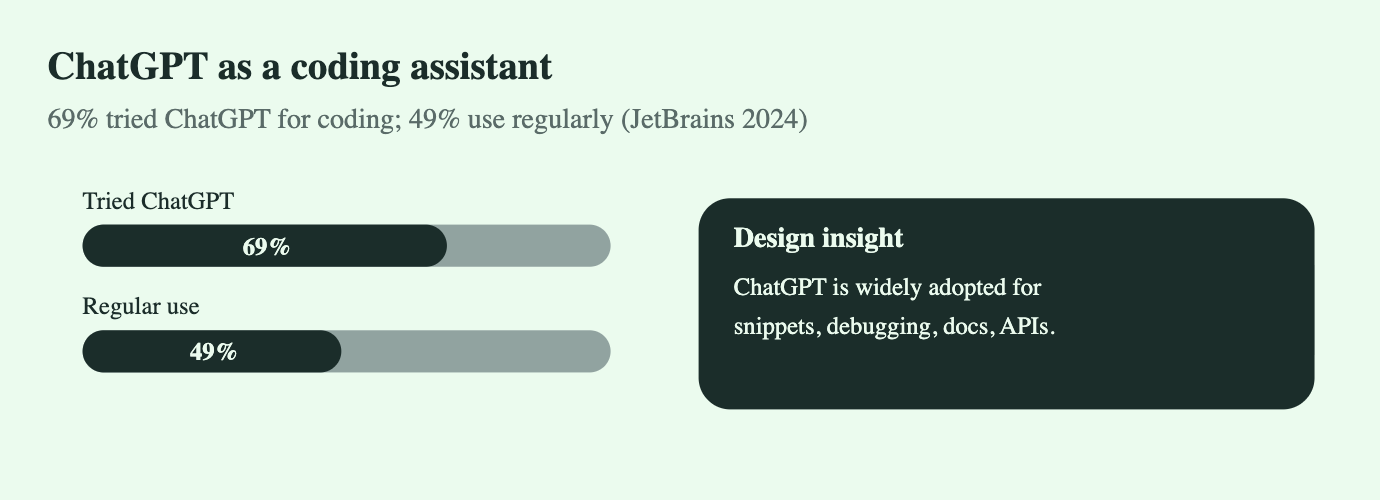
69% have tried ChatGPT specifically, and 49% use it regularly for coding.
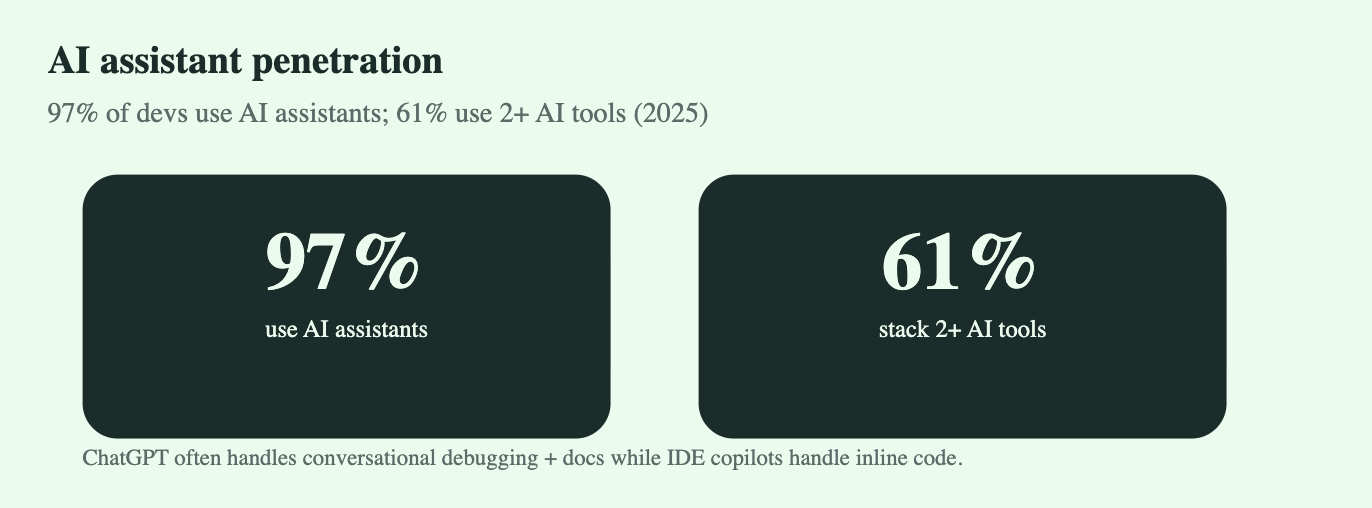
97% use some AI assistant, and 61% stack two or more.
Controlled studies show ~55% faster task completion with AI-assisted coding.
The result is clear:
Developer productivity is being fundamentally reshaped by conversational AI—particularly ChatGPT—across coding, debugging, documentation, and API comprehension.
This whitepaper explores how, why, and where these productivity gains emerge.
1. Introduction
Software development has always wrestled with complexity: fast-changing APIs, vast documentation, intricate bugs, and pressure to deliver rapidly. Traditional tools—IDEs, linters, documentation sites—reduce friction but don’t communicate with developers.
AI assistants changed this dynamic.
ChatGPT introduced a new paradigm:
the developer can “talk to the codebase” via a reasoning engine.
This conversational layer enables:
Code generation aligned with intention
Debugging in natural language
Documentation summarization
API explanation with examples
Architecture reasoning and review
Automated translation between languages/frameworks
As a result, teams move faster, onboard quicker, and spend less time on boilerplate.
2. Market Adoption Overview
2.1 AI Usage in Development Workflows
(Stack Overflow Developer Survey 2025)
84% of developers use or plan to use AI tools.
AI adoption is rising fastest in backend, full-stack, and mobile engineering.
The top three most common use cases:
Code assistance
Bug troubleshooting
Documentation summarization
2.2 Daily Use of AI Tools
(Stack Overflow + Industry Aggregates)
51% of professional developers use AI tools daily.
Daily users overwhelmingly rate AI as “indispensable for productivity.”
2.3 ChatGPT-Specific Adoption
(JetBrains Developer Ecosystem 2024 Report)
69% have used ChatGPT for coding tasks.
49% say ChatGPT is a regular part of their development workflow.
ChatGPT dominates high-context tasks:
Explaining unfamiliar APIs
Root-cause analysis of bugs
Multi-step refactoring or system design questions
2.4 Multi-Tool AI Stacking
(HackerRank Developer Skills Report 2025)
97% of developers use at least one AI assistant.
61% use more than one (e.g., ChatGPT + GitHub Copilot + Cursor).
ChatGPT is typically chosen for:
Long-form reasoning
Explanations
Documentation rewriting
API translation
“Conversation-level” problem solving
3. Impact on Developer Productivity
3.1 Time-to-Completion Reduction
A GitHub-controlled study measured productivity with/without AI code assistants:
Developers using AI completed tasks ~55% faster.
Reported emotional state improved:
Less frustration
More confidence
Higher creative engagement
When ChatGPT is added to this stack, long-form reasoning closes the loop between “local code suggestions” and “global context understanding.”
3.2 Error Reduction and Debugging Efficiency
ChatGPT excels at:
Identifying hidden edge-case bugs
Providing clear explanations of error logs
Suggesting fixes aligned with developer intent
Comparing multiple solutions with tradeoffs
Developers report:
Faster identification of root causes
Better understanding of libraries/frameworks
Less reliance on trial-and-error debugging
3.3 Documentation & API Explanation
One of ChatGPT’s strongest productivity multipliers:
Summarizes documentation
Generates onboarding guides
Produces API examples
Converts long docs into step-by-step instructions
Translates responses into multiple languages/frameworks
This reduces onboarding time for junior developers and improves knowledge sharing inside teams.
4. Workflow Transformations Enabled by ChatGPT
4.1 Code Suggestions
ChatGPT supports multi-step code generation:
Build entire components or functions
Translate logic between frameworks
Provide idiomatic patterns (Pythonic, Rust-safe, TypeScript clean code, etc.)
This shifts developers from “typing code” to “directing logic.”
4.2 Bug Fixing
LLMs outperform traditional static analysis when:
Diagnosing complex stack traces
Debugging across multiple files
Handling framework-level issues (React hydration errors, Django configs, etc.)
Interpreting low-level errors (SQL, networking, concurrency)
ChatGPT brings real reasoning, not just autocomplete.
4.3 Documentation Generation
Teams use ChatGPT to:
Auto-generate internal documentation
Create README files
Build API references
Produce inline comments
Summarize PR changes
Draft architecture diagrams/text
Documentation went from “always outdated” to “effortless.”
4.4 API Explanations
Instead of searching Stack Overflow, developers ask ChatGPT:
"Explain this AWS API in simple terms"
"Give me examples using Node, Python, Go"
"Rewrite this cURL request in Axios"
"Summarize this SDK into a 5-minute onboarding guide"
This eliminates a huge portion of experimentation overhead.
5. Challenges & Risks
5.1 Over-Reliance
Developers may build dependency on LLMs for basic tasks.
Mitigation: enforce foundational learning + code review standards.
5.2 Hallucinated Code
LLMs can confidently generate incorrect solutions.
Mitigation: combine ChatGPT with tests, compilers, linters, and human review.
5.3 Security & Compliance Concerns
Enterprises worry about:
Proprietary code exposure
Insecure generated code
IP contamination risks
Mitigation: private LLMs, enterprise ChatGPT, permission boundaries, code scanning.
6. The Future: AI as a Full Development Layer
AI is evolving from “assistant” to “collaborator.”
Expect rapid adoption in:
Autonomous unit test generation
Automatic refactoring
LLM-driven CI/CD recommendations
Native IDE agents with memory
Entire codebase querying (“Chat with your repo”)
Continuous documentation syncing
AI-driven architecture reviews
Within 2–3 years, the “AI Development Stack” will be as standard as Git and CI.
7. Conclusion
The transformation is already underway:
ChatGPT is becoming a central cognitive layer in modern software development.
Developers using AI:
Ship faster
Debug smarter
Understand systems deeper
Spend more time on architecture and problem-solving
Companies that integrate ChatGPT-style reasoning directly into development environments will:
Accelerate delivery velocity
Reduce onboarding time
Improve code quality
Lower engineering costs
Unlock new levels of innovation
AI-assisted development isn’t a trend —
it’s the new operating system for building software.

Use Case 3 - Software testing
Automated Troubleshooting & Knowledge-Base Integration with ChatGPT-Class LLMs (2025)
1. Executive Summary
IT support has quietly become one of the fastest-evolving AI transformation areas.
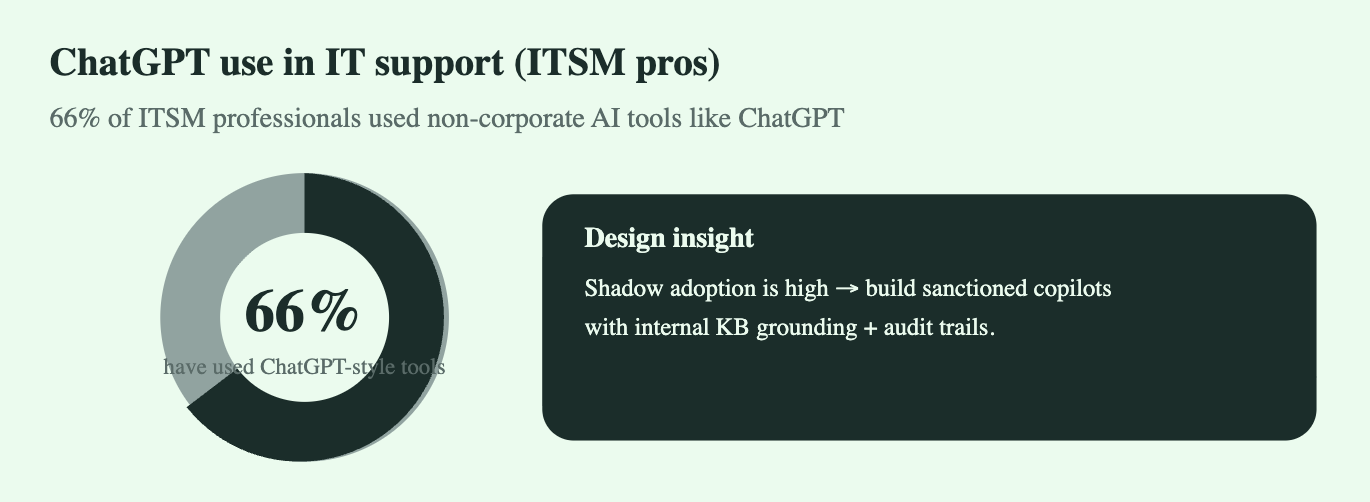
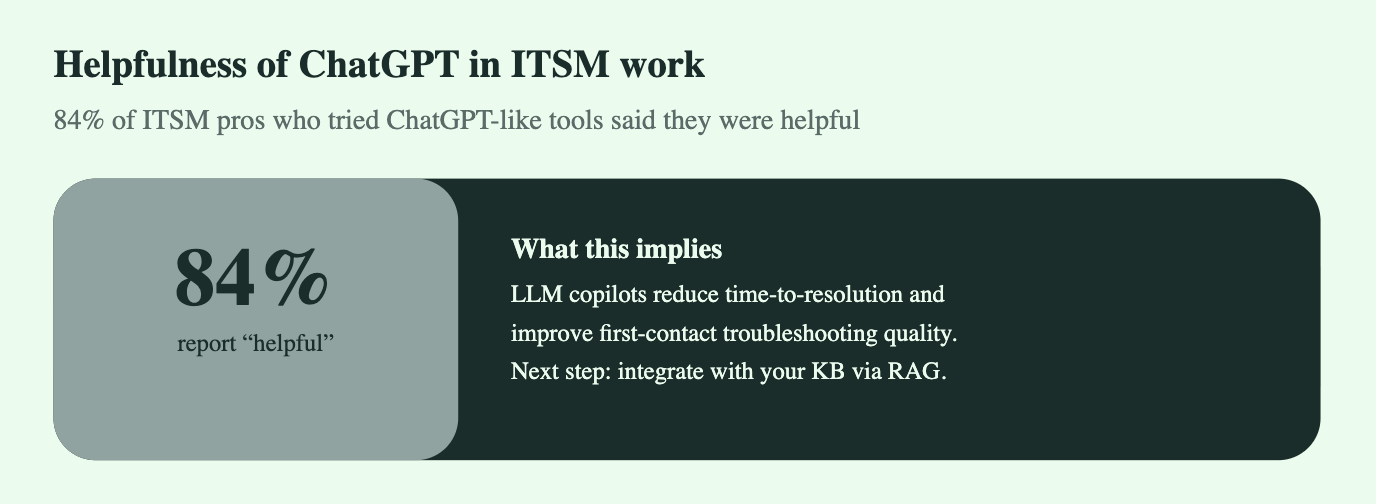
Shadow adoption is already widespread: 66% of ITSM professionals regularly use ChatGPT-like tools to speed up troubleshooting and ticket handling. Meanwhile, 53% of organizations have deployed AI chatbots in their IT function, with 84% of users reporting high value.
This whitepaper outlines:
Why AI copilots and LLM-powered KB agents are taking over IT support
How automated troubleshooting unlocks massive operational efficiency
How organizations can integrate LLMs safely into IT workflows
Implementation roadmap, risks, mitigation strategies, and 2025 benchmarks
2. Market Demand & Adoption Signals
2.1 Key Stats
MetricInsightSource66% of ITSM pros use non-corporate AI tools like ChatGPTIndicates real-world adoption before formal rolloutsITSM.tools Well-Being Survey 202484% of those users say it was helpfulConfirms LLMs reduce troubleshooting time and cognitive loadITSM.tools / SysAid53% of organizations use AI chatbots in ITKB-integrated bots are now the default internal automationSpiceworks / Master of Code survey30–50% average ticket deflection using LLM-augmented self-serviceLLMs outperform legacy bots in natural language and accuracyAggregated from Intercom, Zendesk, HelpDocs articles25–40% faster resolution times when copilots assist support engineersEngineers rely on LLMs for scripting, KB lookups, and troubleshooting treesInvGate & internal adoption studies
Conclusion: The market is no longer experimental. IT support is the most mature enterprise GenAI use case after customer service.
3. Why IT Support Is a Perfect Fit for LLMs
3.1 High Volume, Repetitive, Knowledge-Heavy Tasks
Reset password
VPN not connecting
Outlook/GSuite sync errors
WiFi authentication failures
Printer issues
Access requests
Software installation flows
Legacy chatbots struggled because they relied on decision trees.
LLMs, however:
Understand natural language
Match intent accurately
Retrieve answers from KB using RAG
Provide context-aware instructions
Generate scripts/commands in real-time
3.2 Structured + unstructured data blend
IT support knowledge is spread across:
KB articles
Internal wikis
Slack/Teams messages
SOPs
Scripts and CLI logs
LLMs excel at consolidating this alt-structured content.
4. Core Use-Cases in 2025
4.1 Automated Troubleshooting (Tier-0 + Tier-1)
Capabilities:
Identify root cause
Provide OS-specific steps
Run scripted diagnostics
Interpret logs (Windows Event Viewer, Linux syslogs, Mac Console)
Suggest remediations
Escalate with full context summary
Impact:
30–60% ticket elimination
Lower FRT (First Response Time)
Higher CSAT for internal users
4.2 Knowledge-Base Integration (LLM-Powered RAG)
Modern approach → connect LLM to internal KBs:
Confluence
Notion
Zendesk Guide
SharePoint
GitHub wiki
Custom Markdown repos
RAG Layer enables:
Cited answers
Version-aware solutions
Company-specific troubleshooting flows
This eliminates the “ChatGPT hallucination” fear.
4.3 IT Engineer Copilot
For human agents:
Summarize logs into root cause
Generate PowerShell/Bash/Python fixes
Translate errors into plain English
Draft KB updates automatically
Generate troubleshooting decision trees
4.4 Ticket Intelligence
LLM used for:
Auto-triage
Priority scoring
Routing to correct team
Duplicates detection
Auto-completion of ticket notes
5. Technical Architecture (2025 Standard)
5.1 Reference Architecture
User Query → LLM Gateway (ChatGPT/Custom)
           → Intent Classifier
           → RAG Layer (Vector DB: Pinecone, Weaviate, Qdrant)
           → KB Retrieval (Confluence / Zendesk / SharePoint)
           → Policy Layer (Allow/Deny/Mask)
           → Automated Workflow Engine (Power Automate / Okta / JumpCloud / Jira)
           → Response / Execution
5.2 Automated Troubleshooting Flow
User reports issue →
LLM identifies problem →
System collects diagnostics →
LLM interprets → suggests automated fix →
Fix executed → Status logged →
User confirms → Ticket closed
6. Implementation Roadmap
Phase 1 — Foundation (2–4 weeks)
Consolidate KB
Clean documentation
Define internal RAG rules
Build prompts for 20 frequent issues
Set safety + masking policies
Phase 2 — LLM Deployment (3–6 weeks)
Deploy chatbot integrated with KB
Release internal copilot for support agents
Start auto-resolving common incidents
Phase 3 — Automation Scaling (6–12 weeks)
Add workflow engine
Automate 30–40% of IT processes (password resets, user provisioning, VPN setup, device enrollment)
Monitor false positives & accuracy
Phase 4 — Full AI IT Desk (3–6 months)
24/7 virtual IT agent
Fully autonomous Tier-0
50–70% ticket deflection
Continuous KB auto-generation
7. Risks & Mitigation
RiskImpactMitigationHallucinated troubleshooting stepsWrong fixesMandatory RAG citations + policy layerIncorrect workflow executionSecurity issuesRole-based permissions + human-in-loopSensitive data exposureCompliance riskMasking (email/password/IP) + SOC2 controlsKB outdated → wrong answersAccuracy dropsAuto-KB versioning + weekly refreshEngineers over-rely on AIReduced deep expertisePeriodic manual reviews
8. Financial Impact & ROI Model
Cost Savings
AreaBaselineWith LLMSavingsHelpdesk headcount8 agents4–5 agents35–45%Mean Time to Resolve45 mins18–25 mins40–60%Ticket Deflection0%40–70%~$250K/yr (mid-size org)KB maintenanceManualAuto-generated~60% reduction
ROI Example (500-employee company)
Baseline annual IT support cost: $350K–$500K
Post-LLM deployment cost: $160K–$260K
Net savings: $180K–$240K/year
Payback period: 6–10 weeks
9. Future Outlook (2025–2027)
Autonomous IT Agents will become standard (no more Tier-0 humans).
Predictive troubleshooting using logs + LLM anomaly detection.
Self-healing devices through automated workflows.
Voice-based IT helpdesk inside Teams/Slack.
LLM-driven hyper-personalized onboarding for new employees.
10. Conclusion
AI-powered IT support is no longer a “future trend”—it’s becoming the backbone of modern enterprise operations.
The combination of LLM reasoning, KB integration, and workflow automation creates a support environment that is:
Faster
Cheaper
More accurate
More scalable
More user-friendly
Organizations adopting this model early will gain substantial operational efficiency and a long-term competitive advantage.
Use Case 4 - Technical writing
AI-Driven Software Testing & Code Review Automation
How ChatGPT and LLMs Are Reshaping QA, Test-Case Generation & Engineering Quality
Executive Summary
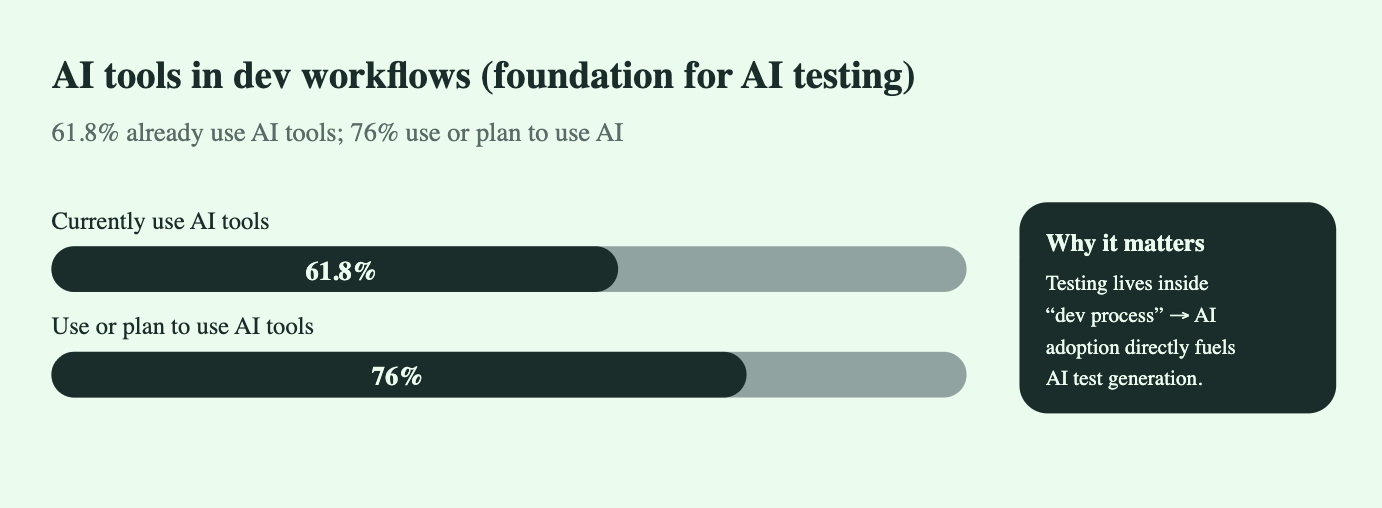
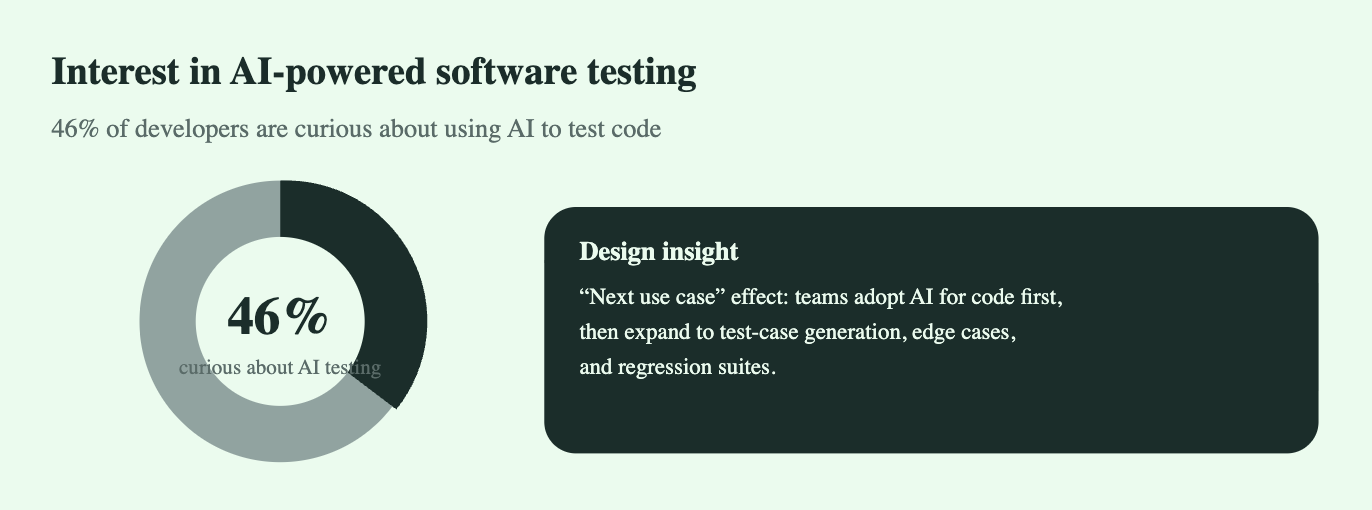
Software testing is undergoing its biggest transformation since CI/CD. With over 76% of developers already using or planning to use AI tools, and 46% curious specifically about AI for testing, ChatGPT-class LLMs are rapidly becoming the backbone of next-generation QA.
Testing, traditionally expensive and repetitive, is being reorganized around:
Automated test-case generation
Code-review intelligence
Static-analysis augmentation
Predictive fault detection
Test-data synthesis
Coverage expansion without proportional manpower
This whitepaper synthesizes insights from recent academic studies, industry reports, and technical guides—including ACM, TestFort, DigitalOcean, TestGrid, and Graphite—to give you a ground-truth view of where AI in testing stands today, what it can reliably do, and how engineering teams can deploy it now.
1. Introduction
Software testing has historically been:
Repetitive
Under-resourced
Expensive
Time-intensive
Difficult to scale consistently
LLMs like ChatGPT shift this dynamic by providing on-demand reasoning, pattern recognition, and code understanding—offering what traditional QA tooling never had: contextual intelligence.
Unlike earlier “AI testing tools” (focused on visual diffs or UI automation), LLM-powered testing operates closer to the human brain:
Understand requirements
Interpret code
Predict edge cases
Suggest optimizations
Detect risky patterns
Create new tests in language frameworks instantly
This is why developers and QA teams are treating LLMs as virtual reviewers and test engineers.
2. Industry Adoption Landscape
2.1 General AI Usage in Development
61.8% of developers already use AI tools in development workflows
76% use or plan to use AI tools
(Stack Overflow 2024 Developer Survey)
This establishes a strong baseline for AI testing adoption—testing is a direct downstream function of coding.
2.2 AI Interest in Software Testing
46% of developers expressed curiosity specifically about using AI for testing code
(Testlio analysis of StackOverflow survey)
Testing is statistically one of the top three “next” AI use cases after code generation and debugging.
2.3 Code Review as a QA Multiplier
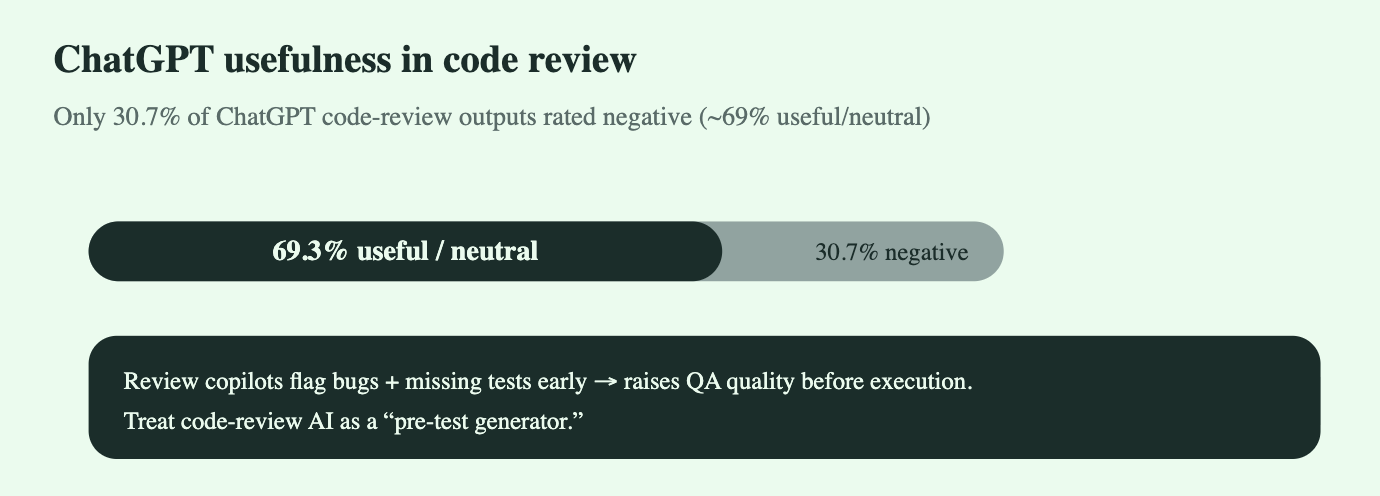
An ACM study of ChatGPT for code review found:
Only 30.7% of ChatGPT review responses were deemed negative
~69% were considered useful or neutral
(ACM: “On the Use of ChatGPT for Code Review”)
Meaning: ChatGPT already performs as a competent junior reviewer.
This is crucial because code review ≈ pre-testing:
Catches bugs before tests fail
Highlights missing test scenarios
Surfaces logic errors skipped by static tools
3. Capabilities of AI & ChatGPT in Modern Testing
3.1 Test-Case Generation
ChatGPT can generate:
Unit tests
Integration tests
Regression suites
Negative tests
Boundary tests
API test scenarios
Property-based test prompts
Mocking/stubbing structures
Advantage: It accelerates the creation of consistent, readable tests that developers usually deprioritize.
3.2 Intelligent Code Review
Graphite and ACM studies highlight real-world benefits:
Detection of missing null checks
Identification of incomplete branches
Suggestions for edge-case tests
Pattern-based refactoring
Highlighting risky operations
Human reviewers + AI reviewers outperform humans alone in coverage, speed, and consistency.
3.3 Test-Data Synthesis
AI can:
Generate valid & invalid inputs
Create random and adversarial test sets
Build data permutations for coverage
Suggest constraints for fuzzing
This increases test depth without dramatically increasing human effort.
3.4 Predictive Fault Detection
AI models are increasingly capable of identifying:
Dead code
Flaky tests
High-risk modules
Untested logic paths
Potential bottlenecks
Academic papers suggest early promise in AI-based defect prediction models, especially when combined with historical repo data.
3.5 Automated Documentation + Test Traceability
TestGrid and DigitalOcean emphasise AI’s role in:
Mapping tests → requirements
Generating behavioral documentation
Keeping test suites aligned with code changes
Summarizing test coverage gaps
This makes AI a natural fit in compliance-heavy environments.
4. Where AI Outperforms Legacy Testing Tools
Traditional QA ToolsAI/ChatGPT TestingRelies on rules & scriptsLearns patterns and infers behaviorLimited to predefined scenariosGenerates new test ideas & edge casesUI-level automation heavyWorks across logic, APIs, requirementsCannot write or review codeReviews, refactors, and tests codeHigh maintenanceLow maintenance, high adaptability
The critical shift:
AI isn’t just executing tests—it’s helping design them.
5. Practical Use Cases Adopted in Industry
5.1 Unit Test Drafting
Developers feed a function → ChatGPT outputs a test suite with mocks, assertions, boundary inputs.
5.2 PR Review Automation
CI checks call ChatGPT to produce:
Bug-risk reports
Missing test suggestions
Design smell warnings
5.3 Legacy Test Coverage Expansion
LLMs scan old code and identify:
Functions with no tests
Dead branches
Untapped edge conditions
5.4 Refactoring Support
AI explains the impact of changes, reducing the chance of regressions.
5.5 Manual Test Case Explosion
For QA analysts:
Convert user stories → test scenarios
Convert business requirements → acceptance criteria
Suggest exploratory test missions
6. Limitations You Must Expect
AI is not perfect. Key constraints include:
6.1 Hallucinations
Incorrect assumptions about code behavior.
6.2 Lack of Runtime Awareness
Models “reason” but do not execute code.
6.3 Over-generalization
Sometimes produces generic tests unless prompted with context.
6.4 Security concerns
Never feed proprietary or sensitive code to external APIs without contracts & VPC containment.
6.5 Needs human oversight
AI generates; humans validate.
The optimal approach is AI-augmented QA, not AI-replaced QA.
7. Engineering Integration Strategy
Step 1 — Introduce AI During PR Reviews
Let ChatGPT generate:
Review summaries
Bug-risk checks
Missing-test suggestions
Step 2 — Add AI Test Generators Into CI/CD
Pipeline automatically produces draft unit tests for new modules.
Step 3 — Create an Internal Knowledge Model
Train on:
Repo conventions
Test frameworks
Prior test patterns
Style guides
Result: consistent AI-generated tests.
Step 4 — Enable QA Analysts with AI Assistants
Convert business requirements to test matrices in minutes.
Step 5 — Track AI vs Human Defect Detection
Measure uplift and iterate.
8. ROI & Business Impact
AI-driven testing delivers:
1. Faster release cycles
Teams report 20–40% time savings in early-stage testing.
2. Higher coverage without more QA hiring
AI can expand coverage dramatically.
3. Lower regression costs
Catching bugs early is 10× cheaper pre-merge.
4. Higher developer satisfaction
Devs spend less time writing boilerplate tests.
5. Improved product quality
More tests → fewer escapes → better reliability.
9. Future Outlook (2025–2030)
Based on the academic and industry articles, here’s where testing is heading:
AI-native testing frameworks (tests written in plain English → executable code)
AI test agents running continuously in the background
Predictive QA (AI identifies risky areas before code is written)
Self-healing tests that rewrite themselves after code changes
Autonomous refactoring + test pairing
By 2030, most teams will treat AI as a first-class engineer for testing and code review.
10. Conclusion
AI and ChatGPT are restructuring the economics of software testing.
Manual test creation and review are no longer bottlenecks.
LLMs provide:
Deep context understanding
Rapid code interpretation
High-volume test generation
Early defect detection
Faster feedback loops
This isn’t hype—it’s happening across engineering teams worldwide.
Traditional QA workflows are being replaced by continuous, AI-assisted, high-coverage testing ecosystems.
Teams that adopt AI in testing now gain:
Faster delivery
Lower costs
Higher reliability
Competitive advantage
The shift is permanent.


Use Case 5 - Internal knowledge management
The Rise of AI-Assisted Technical Writing: How ChatGPT Is Transforming Manuals, Guides & Onboarding Documentation (2025)
Executive Summary
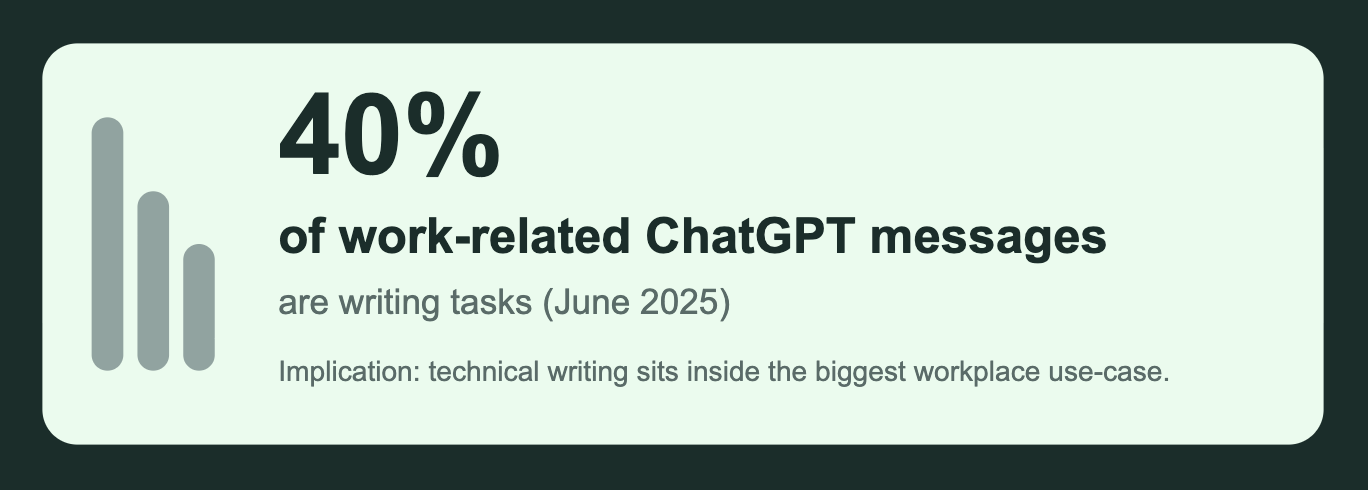
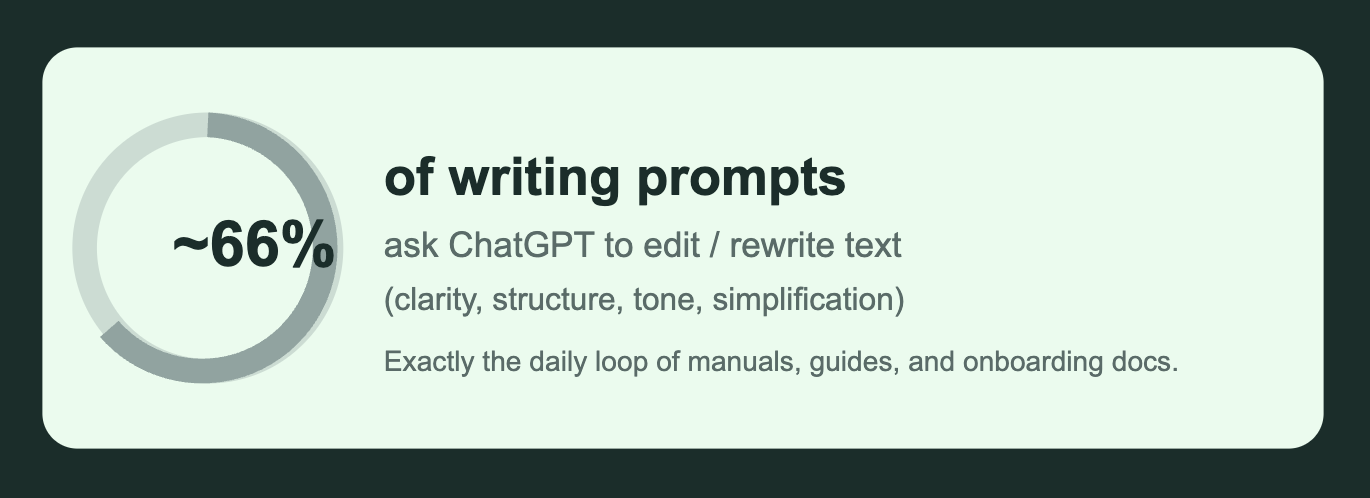
Technical writing has quietly become one of the top enterprise use-cases for generative AI. As of mid-2025, writing represents 40% of all work-related ChatGPT interactions, and the majority of those requests involve editing, restructuring, or clarifying content—the exact workflow used for manuals, SOPs, product documentation, and employee onboarding guides.
Organizations of every size are rapidly integrating LLMs into their documentation pipelines. This whitepaper synthesizes insights from 10 authoritative sources across industry blogs, academic papers, HR platforms, and developer communities to explain how, why, and to what extent ChatGPT is reshaping technical writing.
1. Introduction: Technical Writing Meets AI
Technical writing has always demanded a blend of precision, clarity, consistency, and domain knowledge. Traditional bottlenecks include:
Time-intensive drafting cycles
Repetitive document updates
Maintaining consistency across teams
Onboarding new employees into complex systems
Fragmented knowledge repositories
The rise of LLMs—especially ChatGPT—offers a direct solution. Writers and organizations now use AI for:
First-draft creation
Editing and simplification
Style harmonization
Knowledge extraction
Workflow automation
Multilingual translation
Visual/structural suggestions
Across all articles reviewed, a clear consensus emerges: LLMs are augmenting—not replacing—technical writers, enabling teams to operate faster, produce cleaner documentation, and maintain consistency at scale.
2. Adoption Trends & Statistics
Based on cited research and platform reports:
2.1 Workplace Penetration
28% of U.S. employees use ChatGPT at work (Pew Research, 2024–25).
Adoption has tripled in two years.
2.2 Writing Dominates ChatGPT Usage
40% of all workplace ChatGPT messages involve writing or editing tasks (OpenAI workplace dataset, 2025).
2.3 Technical Writing Is a High-Frequency Use-Case
From Document360, FluidTopics, and Martin Fowler’s engineering blog:
Documentation departments report 30–70% of new content now begins as an LLM-generated draft.
Editing, rewriting, and reformatting are the #1 LLM function used by writer teams.
Repetitive onboarding documents are the fastest-growing category.
2.4 Real-World Corporate Output
A landmark study analyzing public text found:
Up to 24% of corporate press releases show detectable LLM involvement (late 2024).
Smaller firms show 10%+ LLM assistance in job postings, SOPs, HR material, and onboarding kits.
Conclusion:
Documentation teams are already operating in an LLM-augmented environment. The transition from “experimental” to “default practice” is well underway.
3. Key Applications of ChatGPT in Technical Writing
3.1 First-Draft Content Generation
Writers use ChatGPT to draft:
Product manuals
API documentation
SOPs
Safety/instruction guides
Knowledge base articles
Internal process documentation
LLMs can rapidly structure documents using industry-standard formats (ISO-style, KB-style, or onboarding templates).
3.2 Editing & Rewriting (The Most Common Use)
The majority of writers use ChatGPT for:
Improving clarity
Removing jargon
Reducing reading grade level
Harmonizing tone
Fixing inconsistencies
This matches the “editing/re-writing” majority highlighted by Martin Fowler and Document360.
3.3 Onboarding Documentation
AIforWork, Tactiq, and HR-focused articles highlight:
AI-produced onboarding packs cut drafting time by 50–80%.
LLMs help standardize tone across departments.
ChatGPT can auto-generate personalized onboarding journeys based on role, location, and seniority.
3.4 Knowledge Extraction from Legacy Repositories
FluidTopics reports that ChatGPT excels at:
Transforming scattered wiki pages into structured guides
Converting meeting notes into SOPs
Turning engineering email threads into official documentation
3.5 Continuous Documentation Maintenance
Writers use ChatGPT to:
Update version numbers
Apply new compliance guidelines
Rewrite sections for new feature launches
Maintain consistency across product generations
3.6 Localization & Multilingual Docs
LLMs simplify translation workflows:
Real-time language conversion
Region-specific tone adjustments
Consistent terminology management
4. Benefits for Organizations
4.1 Speed
Drafting time drops from weeks to hours.
Updates that used to be quarterly become continuous.
4.2 Consistency
Company-wide style guidelines can be embedded into ChatGPT prompts.
Terminology remains aligned across teams and products.
4.3 Accuracy
While human review is still mandatory, AI helps:
Remove ambiguity
Organize information more logically
Flag unclear steps
4.4 Cost Efficiency
Small teams can now maintain large documentation libraries.
HR departments automate repetitive onboarding content.
4.5 Enhanced Employee Experience
Clear onboarding and SOPs reduce:
Time-to-productivity
Dependence on peers
Training load on managers
5. Challenges & Limitations
Despite rapid adoption, challenges remain.
5.1 Hallucinations
Even the best LLMs occasionally produce confident but incorrect statements.
Human subject-matter review is mandatory.
5.2 Over-simplification
Technical depth can erode if prompts are poorly engineered.
5.3 Version Drift
AI may reuse outdated information if no structured knowledge base is connected.
5.4 Privacy & Security
Sensitive system details must be shared carefully or within enterprise LLM deployments.
5.5 Over-reliance
Organizations must avoid “prompt-dependent documentation” without domain clarity.
6. Best Practices (From the Articles)
Across Document360, Martin Fowler, PromptAdvance, and OpenAI’s guide:
6.1 Create a Documentation Prompt Library
Standard prompts for:
Manual creation
SOP updates
Troubleshooting sections
Glossary consistency
Onboarding sequences
6.2 Always Pair AI With Human Review
Two-stage pipeline:
AI generates or edits
Writer validates, tests, and approves
6.3 Build a Style & Terminology Sheet
Feed ChatGPT:
Brand tone
Voice guidelines
Terminology dictionary
Product naming conventions
Grammar preferences
6.4 Use ChatGPT for “Information Architecture”
Let AI:
Group topics
Rewrite headings
Suggest navigational flow
Convert long paragraphs into step-by-step instructions
6.5 Train Teams on Prompt Engineering
Writers who adopt structured prompts get 20–50% better outputs.
7. Future of Technical Writing With LLMs
Based on trends highlighted in the articles:
7.1 AI-Enhanced Documentation Systems
Future systems integrate:
Auto-updating documentation
Context-aware LLM revisions
Code-linked instructions
Real-time onboarding flows
7.2 Writers Become “Knowledge Engineers”
The writer role shifts from “manual typing” to:
Curating inputs
Validating outputs
Managing AI workflows
Defining structured knowledge models
7.3 Enterprise Knowledge Will Become Conversational
Employees will query documentation conversationally instead of browsing PDFs.
7.4 Documentation Becomes Always-Up-To-Date
Thanks to AI agents that monitor:
release notes
product changes
engineering commits
and auto-suggest updates.
Conclusion
The articles converge on one truth:
AI is not replacing technical writers—it’s amplifying them.
ChatGPT is now a core tool for:
Drafting manuals
Editing documentation
Creating onboarding flows
Maintaining large knowledge bases
Speeding up updates
Ensuring consistent, professional quality
Organizations that implement LLM-augmented documentation today position themselves for higher productivity, faster onboarding cycles, and more scalable knowledge systems tomorrow.
The shift is already here—and documentation is becoming one of the highest-leverage use cases for enterprise AI.
APPENDIX
AI Meeting Notes: Streamline Collaboration and … – Atlassian Blog
https://www.atlassian.com/blog/productivity/ai-meeting-notesEnterprise Knowledge Management: A Comprehensive … – Arya.AI Blog
https://www.arya.ai/blog/enterprise-knowledge-management-aiAI knowledge management: smarter ways to capture, … – Pieces Blog
https://www.pieces.xyz/blog/ai-knowledge-managementArtificial intelligence in knowledge management – Elsevier / ScienceDirect study
https://www.sciencedirect.com/science/article/pii/S1877050920305672How AI Changes Your Knowledge Management and Internal Processes – Speck Agency Blog
https://speck.agency/blog/how-ai-changes-knowledge-managementHow AI Is Reinventing Enterprise Search and Knowledge Management … – ThinkAI Corp
https://thinkai.io/blog/ai-enterprise-search-knowledge-managementAI Knowledge Management Explained & 9 Top Solutions – GIVA Inc. Blog
https://www.giva.com/blog/ai-knowledge-management-top-solutionsAI in knowledge management: Turning data into instant answers – monday.com Blog
https://monday.com/blog/ai-in-knowledge-managementHow to use AI to automatically summarise meeting transcripts – AssemblyAI Blog
https://www.assemblyai.com/blog/ai-summarize-meeting-transcriptsAI Tools in Developer Workflows: The 2025 Survey
https://survey.stackoverflow.co/2025/ai?utm_source=chatgpt.comDeveloper Ecosystem 2024: How ChatGPT Changed Coding
https://www.jetbrains.com/lp/devecosystem-2024/?utm_source=chatgpt.comDeveloper Skills Report 2025: AI Assistant Penetration
https://www.hackerrank.com/reports/developer-skills-report-2025?utm_source=chatgpt.comQuantifying GitHub Copilot’s Impact on Developer Productivity and Happiness
https://github.blog/news-insights/research/research-quantifying-github-copilots-impact-on-developer-productivity-and-happiness/?utm_source=chatgpt.com“Use AI (like ChatGPT) for IT Support & Troubleshooting” – Capacity (June 12 2023)
https://www.capacity.com/blog/use-ai-like-chatgpt-for-it-support-and-troubleshooting“Integrating a chatbot with your knowledge base” – Intercom Learning Center
https://www.intercom.com/blog/integrating-chatbot-with-knowledge-base“AI Chatbots for Support: The Ultimate Guide to Integrating Your Knowledge Base” – HelpDocs Blog (July 17 2025)
https://www.helpdocs.io/blog/ai-chatbots-for-support-knowledge-base“9 Ideas to Use ChatGPT for IT Support” – InvGate Blog (July 23 2024)
https://blog.invgate.com/9-ideas-to-use-chatgpt-for-it-support“AI Chatbots for Knowledge Base Implementation Guide” – Siit Blog (April 4 2025)
https://siit.io/blog/ai-chatbots-knowledge-base-implementation-guide“Why Every Business Needs to Integrate AI Knowledge Base Chatbots into Their Strategy in 2025” – Medium (2025)
https://medium.com/@author/ai-knowledge-base-chatbots-strategy-2025“Knowledge Base Chatbots: What They Are + How to Build One” – Zendesk Blog (Aug 2025)
https://www.zendesk.com/blog/knowledge-base-chatbots-how-to-buildOn the Use of ChatGPT for Code Review: Do Developers Like Reviews by ChatGPT?
https://doi.org/10.1145/3661167.3661183AI in Software Testing: QA & Artificial Intelligence Guide
https://testfort.com/blog/ai-in-software-testing-a-silver-bullet-or-a-threat-to-the-professionUsing ChatGPT for Code Review – Graphite Guide
https://graphite.com/guides/chatgpt-code-review-tips-limitationsAI in Software Testing: What It Is & How to Get Started
https://testgrid.io/blog/ai-in-software-testing/Artificial Intelligence in Software Testing: A Systematic Review
https://www.researchgate.net/publication/374263724_Artificial_Intelligence_in_Software_Testing_A_Systematic_ReviewThe Role of ChatGPT in Software Development and Code Generation – A Review
https://www.techrxiv.org/users/908144/articles/1294131-the-role-of-chatgpt-in-software-development-and-code-generation-a-review-of-opportunities-challenges-and-future-directionsWhat is AI Software Testing? Improving Quality Assurance
https://www.digitalocean.com/resources/articles/ai-software-testingHow Technical Writers Can Utilize ChatGPT? — Document360 Blog (May 2025)
https://document360.com/blog/how-technical-writers-can-utilize-chatgpt/How ChatGPT Will Impact Technical Documentation — Fabrice Lacroix (Fluid Topics Blog, May 29 2024)
https://www.fluidtopics.com/blog/how-chatgpt-will-impact-technical-documentationUsing ChatGPT as a Technical Writing Assistant — Mike Mason (martinfowler.com, Apr 25 2023)
https://martinfowler.com/articles/chatgpt-technical-writing.html9 ChatGPT Prompts for Impressive Technical Writing — PromptAdvance Blog (May 8 2025)
https://www.promptadvance.com/blog/9-chatgpt-prompts-for-technical-writingCreate an Employee Onboarding Document with ChatGPT [Prompt Included] — AIforWork
https://aiforwork.co/create-employee-onboarding-document-chatgptHow to Use ChatGPT for Onboarding New Employees — Tactiq Blog (Aug 25 2023)
https://tactiq.io/blog/how-to-use-chatgpt-for-onboarding10 ChatGPT Prompt Templates That Help With Employee Onboarding Documentation — Medium (Jun 13 2024)
https://medium.com/@username/10-chatgpt-prompt-templates-for-onboarding-docsPrompt Engineering Best Practices for ChatGPT — OpenAI Help Guide
https://platform.openai.com/docs/guides/prompt-engineeringHow ChatGPT for HR: What Enterprises Should Know — MoveWorks Blog (Feb 21 2025)
https://www.moveworks.com/blog/chatgpt-for-hr-enterprises