
The Advanced Guide to Prompt Engineering: 12 Steps to High-Quality LLM Outputs
This instructional guide is based on the methods used to build high-performing, business-grade prompts for Large Language Models (LLMs).
Part 1: Foundational Setup & Environment
The initial setup dictates how much control and performance you can achieve.
Step 1: Use the API Playground, Not the Consumer App
Do not rely on consumer models like the standard ChatGPT or Claude interfaces.
Action: Migrate all serious prompt development to the API Playground (or workbench) version for your chosen model (e.g., OpenAI's Platform).
Why? The playground gives you access to crucial controls like System Messages, Temperature (Randomness), and Max Tokens, allowing you to engineer results, not just chat for them.
Step 2: Choose the Right Model for the Task
Do not default to the cheapest model. For most business applications, the performance gain from a smarter model is worth the marginal cost.
Action: Begin by testing with the smarter, more complex models (e.g., GPT-4 or comparable).
Why? The cost difference is often minimal across millions of tokens, but the smarter model will eliminate a significant percentage of problems, saving iteration time and boosting accuracy from the start.
Part 2: Mastering the Core Structure
Structure is the single most important factor for reliable, high-quality results.
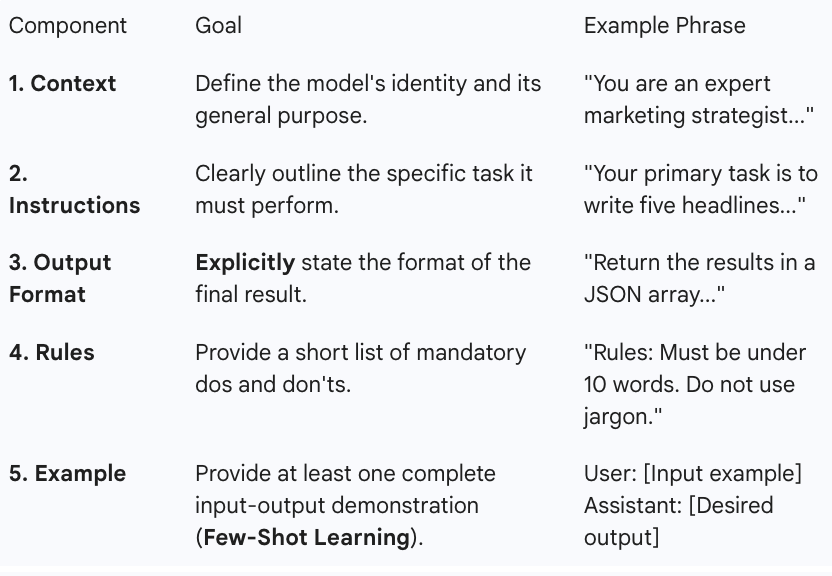
Step 3: Implement the 5-Part Key Prompt Structure
Adopt a consistent framework to ensure the model understands its role, task, and expected output.
Step 4: Use One-Shot Prompting for Maximum Accuracy
The biggest jump in accuracy comes from moving from zero examples to just one example.
Action: Always include at least one complete User/Assistant prompt pair in your structure (the "Example" part from Step 3).
Why? This is called one-shot learning. It provides a massive, disproportionate increase in model accuracy compared to adding multiple examples, while also keeping your prompt length short.
Part 3: The Accuracy & Efficiency Hacks
These steps refine your language to ensure the model's output aligns precisely with your intent.
Step 5: Practice "Shrink-to-Gain" to Boost Performance
Model performance decreases as prompt length increases.
Action: Ruthlessly edit your prompt to increase its information density. Cut out redundant words, fluff, and unnecessary verbosity.
Example: Replace a sentence like "The overarching aim of this content is to produce an exceptionally well-structured, highly informative, deeply engaging..." with: "Your task is to produce high-quality, authoritative content that is readable and avoids excessive fluff." This conveys the same meaning in a fraction of the tokens.
Step 6: Eliminate Ambiguity and Conflicting Instructions
Vague or contradictory terms confuse the model and dilute the output quality.
Action: Be absolutely unambiguous. For instance, never use the phrase "detailed summary."
Why? A "summary" means to simplify; "detailed" means to elaborate. These conflicting instructions force the model to guess, leading to inconsistent, poor, and unnecessarily long outputs.
Step 7: Define a "Spartan" Tone
Using specific, powerful adjectives for tone can instantly improve the output's utility.
Action: Include the instruction: "Use a Spartan tone of voice."
Why? This term is a reliable shortcut for prompting direct, pragmatic, clear, and assertive language, which is ideal for most business use cases.
Step 8: Iterate Your Prompts with Data (Monte Carlo Testing)
Do not trust a single good result. LLMs have a range of possible responses, and your first good one might be a fluke.
Action: Implement a Monte Carlo Testing approach:
Run your prompt 10 to 20 times on the same input.
Review each output and mark it as "Good Enough" or "No."
Calculate your success rate (e.g., 18/20 = 90%).
Make a small edit to the prompt and repeat the test.
Why? This data-driven approach ensures your prompt is statistically reliable and consistently performs in the desired "Goldilocks Zone" of responses.
Part 4: Automation & Integration
These tips are necessary for integrating LLMs into larger automation workflows.
Step 9: Explicitly Define Structured Output (JSON, CSV, XML)
To connect your LLM output to other applications, you need a machine-readable format.
Action: When defining your "Output Format" (Step 3), specify a structured data format, such as:
Return your results in **JSON** using the keys: "title", "relevance", and "icebreaker".Generate a **CSV** with 'Month', 'Revenue', and 'Profit' headings.
Why? This allows the output to be automatically parsed and used by scripts, spreadsheets, or other software without manual cleanup.
Step 10: Treat LLMs as Conversational Engines (Not Databases)
Understand the LLM's core limitation: it excels at generating text patterns but is poor at recalling precise facts.
Action: For tasks requiring up-to-date, specific, or external facts, integrate the LLM with a knowledge source (e.g., a database, web search, or file content).
Why? The most powerful applications use the LLM for reasoning, structuring, and conversing, while relying on a separate system for factual retrieval (often called Retrieval Augmented Generation, or RAG).
Step 11: Learn to Parse XML, JSON, and CSV
To fully utilize structured output, you must understand the fundamentals of these formats for passing data to and from other systems.
Action: Familiarize yourself with the syntax and structure of JavaScript Object Notation (JSON), eXtensible Markup Language (XML), and Comma-Separated Values (CSV).
Why? This knowledge is essential for successfully integrating your LLM with no-code tools (like Make or Zapier) or backend code.
Step 12: Automate Example Generation
If you need many few-shot examples (Step 4), save time by having the model create them for you.
Action: Ask your current LLM prompt to generate a "similar training example" based on the format and rules you've already defined.
Why? This efficiently generates high-quality, formatted examples that can immediately be inserted back into your main prompt for iterative few-shot training.